Picksights

Impresoras · Comparativa

Epson EcoTank ET-2803 vs Brother HL-L2465DW

La comparación que de verdad define esta categoría: tinta de tanque a color contra láser monocromo. Se reduce a una sola pregunta — ¿imprimes en color con regularidad?— porque en todo lo demás cada una gana en su propio terreno.

Última actualización 2026-07-29.

Picksights puede recibir una comisión si compras a través de los enlaces de esta página. Esto nunca afecta a qué productos puntuamos más alto — nuestro Picksights Score se calcula a partir de especificaciones publicadas antes de considerar cualquier relación de afiliación. Consulta nuestra metodología de puntuación más abajo.

Como afiliado de Amazon, Picksights obtiene ingresos por las compras que cumplen los requisitos aplicables.

Comparativa rápida

Ordenado por Picksights Score. Los precios son aproximados y cambian con frecuencia.
ProductoPicksights ScoreDesdeIdeal para
#1 · Epson Epson EcoTank ET-28038.4/10≈€165Best for most homes
#2 · Brother Brother HL-L2465DW8.2/10≈€156Best if you never print in colour

Desliza la tabla hacia los lados para ver todas las columnas.

Mejor opción

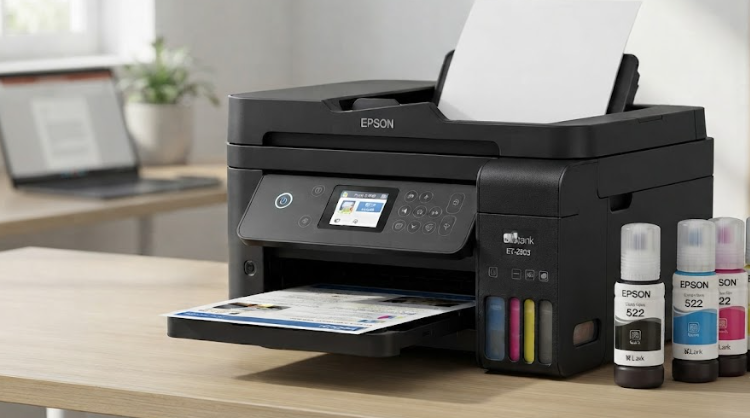
Epson Epson EcoTank ET-2803

Epson

Número 1: Epson EcoTank ET-2803

PS8.4/10

Best for most homes

The default recommendation for a house rather than an office. It does the three things households actually need — print, scan, copy — and it does them with the ink economics that make tank printers worth the higher sticker. You give up the document feeder, which matters only if you regularly scan stacks of paper. If you do, spend the extra $40; if you do not, this is the one.

Ventajas

  • Around two years of ink in the box, so the first refill is a long way off
  • The cheapest genuine tank printer here, and the running-cost advantage is identical to the pricier model
  • Simple enough that it is the sensible default for a household

Contras

  • No document feeder — scanning multiple pages means feeding them one at a time
  • No fax or Ethernet
  • Colour output is adequate rather than good

Desde ≈€165Aproximado — el precio puede variar

Fuentes: RTINGS printer testing (2026) · TechRadar (standardised test across 200+ printers) (2026-07)Última revisión de Picksights: 2026-07-29
Brother Brother HL-L2465DW

Brother

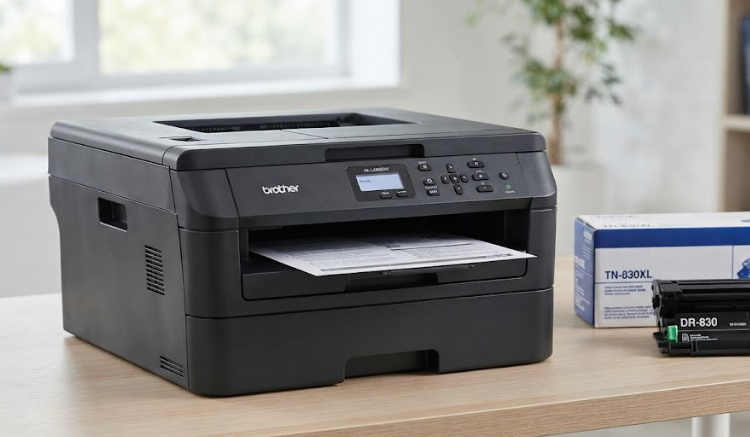
Número 2: Brother HL-L2465DW

PS8.2/10

Best if you never print in colour

The honest answer for a large number of people who buy colour printers and never print in colour. Consumer Reports' position is blunt: if you do not need colour, buy a mono laser, because they are far more reliable. And the reason matters — toner does not dry out, so this survives being ignored for three months, which is exactly what kills an inkjet. Print one photo a year at a shop and you will still be ahead.

Ventajas

  • Consumer Reports' testing finds lasers markedly more reliable than inkjets, which is the complaint most printer owners actually have
  • Toner does not dry out, so it survives months of not being used — the failure mode that kills inkjets
  • Crisp text at speed, with automatic two-sided printing

Contras

  • No colour whatsoever, which rules it out for anyone printing photos or school projects
  • Per-page cost is higher than bottled tank ink, though far below cartridges
  • No fax or document feeder

Desde ≈€156Aproximado — el precio puede variar

Fuentes: Consumer Reports (laboratory testing and cost-of-ownership modelling) (2026-06-24) · TechRadar (standardised test across 200+ printers) (2026-07)Última revisión de Picksights: 2026-07-29

La pregunta real: ¿necesitas color?

La ET-2803 es la respuesta si necesitas color con cierta regularidad — trabajos escolares, fotos ocasionales, gráficos. Su sistema de tinta de tanque mantiene el coste de uso bajo, y viene con aproximadamente dos años de tinta de fábrica.

La Brother HL-L2465DW gana si nunca imprimes en color: Consumer Reports es tajante en que las láser son notablemente más fiables que las de inyección de tinta, y su tóner no se degrada con el tiempo — sobrevive a meses sin usarse, justo el fallo que mata a las impresoras de tinta que se dejan de lado.

Cómo puntuamos

Picksights Score es una media ponderada de 4 criterios, igual que en el ranking completo de impresoras:

  • Coste de uso — 35%
  • Calidad de impresión — 25%
  • Precio — 25%
  • Funciones — 15%